


一、GeoIP2 Module介绍
GeoIP2 是 MaxMind 提供的IP地址归属地查询服务的产品系列之一。GeoIP2模块是一种在Nginx上运行的模块,用于根据客户端IP地址的地理位置信息对HTTP请求进行筛选和限制。这个模块允许您使用MaxMind的GeoIP2数据库来识别客户端的IP地址,以便可以根据他们所处的国家、省、市和网络运营商等信息对其进行策略限制。
二、GeoIP2 数据库包含的内容和功能
GeoIP2数据库包括以下内容:
- GeoLite2 Country:包含国家的位置和国家代码。
- GeoLite2 City:包含城市的位置、邮政编码、所在州和国家代码。
- GeoLite2 ASN:包含互联网自治系统(ASN)的信息。
- GeoLite2 Connection Type:包含IP地址连接类型的信息(例如,Cable/DSL)。
- GeoLite2 Domain Name:包含IP地址所属的域名的信息。
使用GeoIP2模块可以防范以下攻击:
- 限制来自特定国家或地区的访问。
- 阻止来自匿名代理、TOR网络等的访问。
- 限制来自特定互联网服务提供商的访问。
- 限制来自已知的恶意IP地址的访问。
先看一下本站的效果演示
- 如果你是中国大陆地区的访问IP,访问下面文章链接将会看到 403 拒绝访问的提示:访问地址

三、GeoIP2 Module安装
1、查看已经安装模块
- 如果 nginx 是
rpm包安装的,直接用如下命令:
nginx -V- 如果你是源码包编译安装,假如你的安装路径是
/usr/local/nginx,那么你可以使用:
/usr/local/nginx/sbin/nginx -V注意是大写的V,这样你就可以看到 nginx 已经加载的模块了
2、安装 libmaxminddb
EL代表Enterprise Linux,是Red Hat Enterprise Linux(RHEL)的缩写
yum -y install https://repo.aerisnetwork.com/pub/aeris-release-`rpm -E %rhel`.rpm- 安装
libmaxminddb,EL 8 和EL 9请把yum换成dnf
# EL 7
yum install -y libmaxminddb libmaxminddb-devel ccache libxml2-devel libxslt-devel GeoIP-devel

# EL 8\9
dnf install -y libmaxminddb libmaxminddb-devel ccache libxml2-devel libxslt-devel

# 安装整个开发工具组
dnf groupinstall "Development Tools
3、安装GeoIP2动态模块
- 注意:将
GeoIP2模块文件存储在一个单独的目录下,然后通过Nginx编译时加载进去
[root@localhost ~]# mkdir -p /opt/nginx/geoip2 && cd $_
[root@localhost geoip2]# git clone https://github.com/leev/ngx_http_geoip2_module.git
4、编译GeoIP2成动态库
4.1:下载对应源码
请根据您的 nginx 版本,选择对应版本的源码进行下载,跨越版本会导致插件无法正常工作,可能会需要您重新编译
# 查看当前使用的Nginx版本
[root@localhost ~]# NG_VER=$(nginx -v 2>&1 | awk -F "/" '{ print $2 }')
[root@localhost ~]# echo ${NG_VER}
1.24.0

# 下载对应的版本的nginx源码包到服务器上
[root@localhost ~]# wget https://nginx.org/download/nginx-${NG_VER}.tar.gz
[root@localhost ~]# tar -xf nginx-${NG_VER}.tar.gz
4.2:编译加载配置
关于编译 nginx 动态模块需要注意一下,如果想使用configure命令编译动态模块,必须保证原来的 nginx 在编译的时候就带有 –with-compat (动态编译)参数,否则编译出来的动态模块是无法加载的,此时想要添加动态模块只能原样复制原来的 nginx 的完整的 configure 参数然后追加 –add-dynamic-module=/path/to/module 才行。
# 通过下面的命令查看当前Nginx安装的模块,然后通过sh快速执行
[root@localhost ~]# nginx -V 2>&1 | grep configure | sed -e 's/^configure arguments: //' -e 's/ --add-module.*$//' -e 's/ --add-dynamic-module.*$//' > /tmp/nginx_build_options.txt

[root@localhost ~]# cd nginx-${NG_VER}

[root@localhost nginx-1.24.0]# sh -c "./configure $(< /tmp/nginx_build_options.txt) --add-dynamic-module=/opt/nginx/geoip2/ngx_http_geoip2_module"
4.3:构建模块
注意:只需要make不要进行make install(如果是新装的Nginx就需要install),不然会覆盖原来的所有信息
make modules4.4:加载模块
ls objs/*.so
- 注意下面拷贝的这个地址是
rpm、yum安装后自动生成的模块存储路径,源码安装的 nginx 需要自定义
cp objs/*.so /usr/lib64/nginx/modules/4.5:修改Nginx配置加载模块
vi /etc/nginx/nginx.conf

# Maxmind GeoIP2
load_module "/usr/lib64/nginx/modules/ngx_http_geoip2_module.so";
load_module "/usr/lib64/nginx/modules/ngx_stream_geoip2_module.so";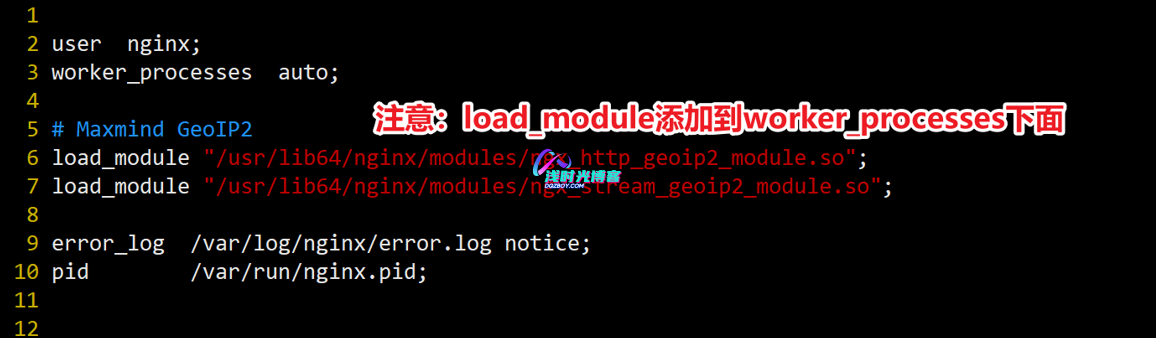
四、配置最新IP地址库
1、下载导入数据库文件
IP地址库数据库文件可以到 MaxMind 官方下载,也可以通过本站提供的链接进行下载(本地提供的文件不会及时跟随官方进行更新,也无需追求最新版本)
链接: https://pan.baidu.com/s/1oidLLpI6KeaGFq3SMjJVBA
提取码: 3ms4
解压密码:本站地址
- 把 mmdb 库放到
/usr/share/GeoIP2目录下(没有则创建)
[root@localhost ~]# mkdir -p /usr/share/GeoIP2 && cd $_
[root@localhost GeoIP2]# tar -xf GeoLite2-City_20250715.tar.gz
[root@localhost GeoIP2]# tar -xf GeoLite2-Country_20250715.tar.gz

# 将解压目录下的.mmdb文件移动到当前目录下
[root@localhost GeoIP2]# mv GeoLite2-City_20250715/GeoLite2-City.mmdb ./
[root@localhost GeoIP2]# mv GeoLite2-Country_20250715/GeoLite2-Country.mmdb ./

# 删除其他不需要的文件
[root@localhost GeoIP2]# rm -rf *.gz *_*

# 授权给nginx运行用户
[root@localhost GeoIP2]# chown -R nginx. /usr/share/GeoIP2/
2、配置Nginx加载数据库
[root@localhost GeoIP2]# vi /etc/nginx/nginx.conf
    # geoip 模块变量绑定
    geoip2 /usr/share/GeoIP2/GeoLite2-Country.mmdb {
        # 启用自动重新加载将使 nginx 以指定的时间间隔检查数据库的修改时间,如果发生更改则重新加载。
        auto_reload 5m;
        $geoip2_country_code country names en;
    }
    geoip2 /usr/share/GeoIP2/GeoLite2-City.mmdb {
        $geoip2_data_country_name country names en;
        $geoip2_data_country_code default=China source=$remote_addr country iso_code;
        $geoip2_data_city_name city names en;
        $geoip2_data_province_name subdivisions 0 names en;
        $geoip2_data_province_isocode subdivisions 0 iso_code;
        $geoip2_continent_code continent code;
}- 添加一个
location规则,用来绑定GeoIP变量,我们进行测试是否生效
[root@localhost GeoIP2]# vi /etc/nginx/conf.d/default.conf
    # 该路径显示当前请求访问地址信息
    location = /info {
       default_type text/plain;
       return 200 "$remote_addr\n geoip2_country_code=$geoip2_country_code\n geoip2_data_country_name=$geoip2_data_country_name \n geoip2_data_country_code=$geoip2_data_country_code \n geoip2_data_city_name=$geoip2_data_city_name \n geoip2_continent_code=$geoip2_continent_code \n geoip2_data_province_name=$geoip2_data_province_name \n geoip2_data_province_isocode=$geoip2_data_province_isocode";
    }
3、访问站点验证
- 网站地址IP后面跟上
/info查看
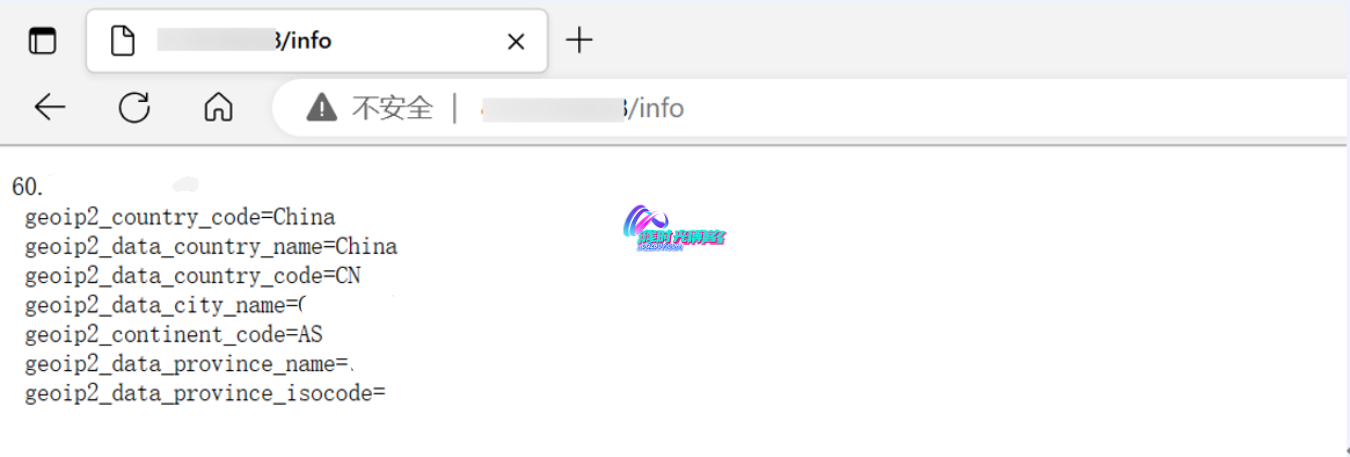
看到上图的返回结果,就表示Geo IP模块生效,并且可以正确识别到国家IP数据库,后续我们可以使用IP数据库来提高网站的安全性!




必须 注册 为本站用户, 登录 后才可以发表评论!